SIE Batch User Guide
The Security Information Exchange (SIE), from Farsight Security® Inc. (now a part of DomainTools), is a highly scalable security information sharing platform. Think of SIE as “radar for the Internet”—a way to study what is happening online. Farsight collects and redistributes more than 200,000 raw observations per second from its global network of sensors. Farsight also applies unique proprietary methods to improve the usability of that data, sharing refined intelligence with SIE customers directly and via DNSDB, one of the world’s largest passive DNS databases.
SIE distributes a variety of data types for security professionals, including:
- Raw and processed passive DNS data
- Darknet/darkspace telescope data
- SPAM sources and URLs
- Phishing URLs
- Connections from malware-infected systems (as seen by a sinkhole)
- Intrusion detection system (IDS) and firewall connection block data
SIE Batch is a delivery method that gives you access to a RESTful API to download data as needed. It also has a web-based interface to define your data sets and download them. With SIE Batch you can select the data sets and time periods of interest to you, download that data and have it available for your analysis. SIE Batch allows you to access data two ways:
- Via the SIE Batch API: The API allows you to write programs to pull down data for processing automatically.
- Interactively: There is a web-based interface that acts as a front end to the API and allows you to select and download sets of data on demand.
SIE Batch gives you access to the most recent data distributed via the SIE system. How much data is available depends on the channel you are pulling data from, but is typically the most recent 12-18 hours.
SIE Batch is not intended for near-real-time data access. Use SIE Batch for periodic downloads, such as hourly updates. If your use case requires timely access to data (for example, real-time or near-real-time), use SIE Remote Access (SRA) instead.
Accessing SIE Data Interactively via SIE Batch
Section titled “Accessing SIE Data Interactively via SIE Batch”The SIE Batch system requires a subscription to the SIE data. When you set up the subscription, you receive an API key that gives you access to the system.
If you do not have an active subscription, contact the DomainTools sales team.
After you log in to the browser API, you see the SIE Batch dashboard. SIE data is returned in one of two formats: Newline Delimited JSON (ND-JSON) and NMSG. ND-JSON formatted files have a .ndjson suffix, while NMSG formatted files have a .nmsg suffix. Most channels return data in ND-JSON format, with the highest volume channels using NMSG because it is more compact.
{ "time": "2020-01-13 17:53:00.097326040", "vname": "SIE", "mname": "newdomain", "source": "a1ba02cf", "message": { "domain": "clienttons.com.", "time_seen": "2020-01-13 16:16:04", "bailiwick": "ipv4-only.cname.clienttons.com.", "rrname": "jdkyqftipq6rwxq4s7ca-pw7etn-d8f0af301.ipv4-only.cname.clienttons.com.", "rrclass": "IN", "rrtype": "CNAME", "rdata": [ "a248.b.akamai.net." ], "keys": [], "new_rr": [] }}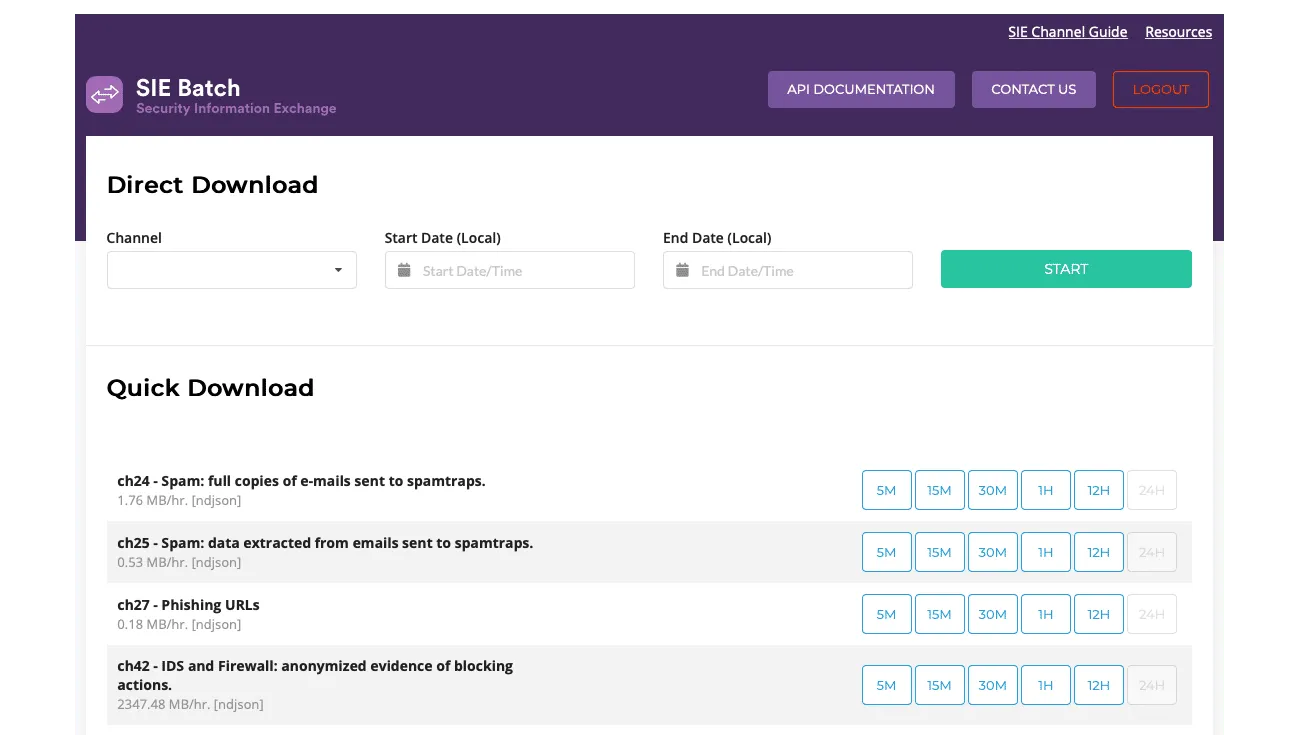
On this page, select the channel and date range for the data you want. The system confirms the channel, sets a default date range for the records to download, and shows you the average hourly data volume for the channel. You can accept this date range or specify your own. You can set any date range as long as the data is available. Channel data expires from the system between 12 and 20 hours, depending on the data rate for each channel.
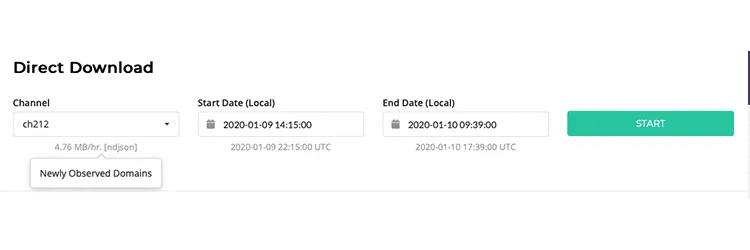
Click Start to generate a data file for download.
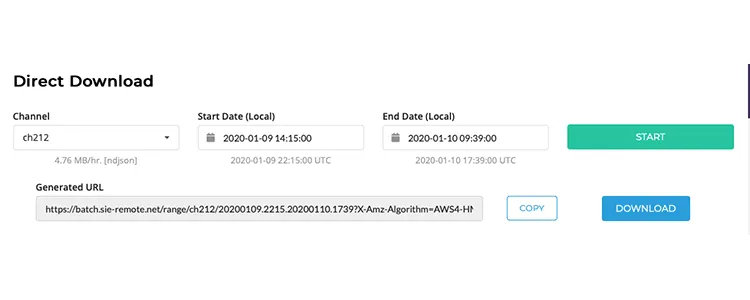
Click Download to download the file through the browser. For channels with high data rates, this can take some time. Click Copy to copy the URL to your clipboard so you can pass it to a processing program or other system.
To get the most current data, set the time to approximately ten seconds before the current time. The generated URL downloads the same data set if used again later, as long as the data remains available. The chfetch API call is equivalent to the Download button in the browser.
Below the Direct Download section is a Quick Download section that provides commonly used downloads for your subscribed channels, giving you quick access to the most recent data available.
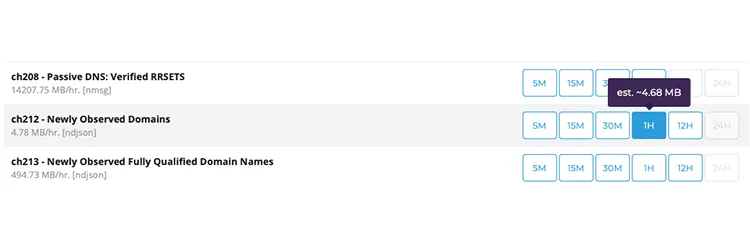
Click the appropriate time segment for the channel you want to download. To see an estimate of the file size, hover over the download button.
After you download the files, you can process and evaluate the data with your own programs.
Newline Delimited JSON (ND-JSON) formatted files
Section titled “Newline Delimited JSON (ND-JSON) formatted files”ND-JSON files are formatted text files. The specific fields vary by channel. The following example shows data from Channel 213 (Newly Observed Domains):
{"time":"2020-01-13 17:53:00.097143888","vname":"SIE","mname":"newdomain","source":"a1ba02cf","message":{"domain":"alibaba.com.","time_seen":"2020-01-13 17:51:47","bailiwick":"alibaba.com.","rrname":"fuz8fk.tdum.alibaba.com.","rrclass":"IN","rrtype":"CNAME","rdata":["tdumproxy.alibaba.com."],"keys":[],"new_rr":[]}}
{"time":"2020-01-13 17:53:00.097326040","vname":"SIE","mname":"newdomain","source":"a1ba02cf","message":{"domain":"clienttons.com.","time_seen":"2020-01-13 16:16:04","bailiwick":"ipv4-only.cname.clienttons.com.","rrname":"jdkyqftipq6rwxq4s7ca-pw7etn-d8f0af301.ipv4-only.cname.clienttons.com.","rrclass":"IN","rrtype":"CNAME","rdata":["a248.b.akamai.net."],"keys":[],"new_rr":[]}}
{"time":"2020-01-13 17:53:00.097453117","vname":"SIE","mname":"newdomain","source":"a1ba02cf","message":{"domain":"yandex.ru.","time_seen":"2020-01-13 17:51:52","bailiwick":"yandex.ru.", "rrname":"203859815.verify.yandex.ru.","rrclass":"IN","rrtype":"CNAME","rdata":["an.yandex.ru."],"keys":[],"new_rr":[]}}
You can view ND-JSON files directly or use any tool that supports the ND-JSON format.
NMSG formatted files
Section titled “NMSG formatted files”NMSG files use a binary format and cannot be viewed directly. Farsight provides tools that decode and display NMSG formatted content. The NMSG tool is available on GitHub at https://github.com/farsightsec/nmsg.
To view NMSG data, run nmsgtool, which formats an NMSG file as readable text. The following example shows output from Channel 221 (NXDomains) using the command nmsgtool -r:
[43] [2020-01-13 17:46:47.996798921] [2:6 SIE dnsnx] [a1ba02cf] [] []qname: xvu.co.ls.qclass: IN (1)qtype: AAAA (28)response_ip: 196.216.168.70soa_rrname: co.ls.
[70] [2020-01-13 17:46:47.996805233] [2:6 SIE dnsnx] [a1ba02cf] [] []qname: 246.25.155.49.in-addr.arpa.qclass: IN (1)qtype: PTR (12)response_ip: 194.146.106.106soa_rrname: 49.in-addr.arpa.
[68] [2020-01-13 17:46:47.996816452] [2:6 SIE dnsnx] [a1ba02cf] [] []qname: vla1-3s19.yndx.net.yandex.net.qclass: IN (1)qtype: AAAA (28)response_ip: 93.158.134.1soa_rrname: yandex.net.
[64] [2020-01-13 17:46:47.996831866] [2:6 SIE dnsnx] [a1ba02cf] [] []qname: USTPE2LJ6XDVZ1.jacobs.com.qclass: IN (1)qtype: SOA (6)response_ip: 13.107.24.8soa_rrname: jacobs.com.
[63] [2020-01-13 17:46:47.996873084] [2:6 SIE dnsnx] [a1ba02cf] [] []qname: _ldap._tcp.pdc._msdcs.sg.com.qclass: IN (1)qtype: SRV (33)response_ip: 207.204.40.129soa_rrname: sg.com.
SIE Batch API
Section titled “SIE Batch API”See the SIE Batch API Reference for API documentation.